

Businesses that are retiring computers, servers, laptops and storage devices, may not be able to safeguard their sensitive data by simply deleting files or doing a factory reset. Data may continue to be accessible from the storage media after equipment has been retired or even if it is sold on, donated, or recycled, which can cause security and privacy concerns.
NIST Special Publication 800-88 provides guidance for securely sanitizing electronic media according to the sensitivity of the information and the intended disposition of the equipment. Its latest final revision, NIST SP 800-88 Rev. 2, was published on September 26, 2025. It emphasizes establishing an organizational media sanitization program with appropriate methods, controls, and verification.
This guidance can help businesses learn how to protect confidential information and re-use equipment and electronics responsibly when they are retired.
What Is NIST SP 800-88?
NIST SP 800-88, Guidelines for Media Sanitization, is a publication from the National Institute of Standards and Technology (NIST). It enables organizations to set up protocols for making information on electronic media inaccessible at a specified degree of effort.
The guidance covers data storage media that carry sensitive data, such as hard drives, solid-state drives (SSDs), removable media, and other media that support data.
NIST does not prescribe an approach for each circumstance, but suggests a risk-based approach to consider:
- Data sensitivity: Whether the device contains customer records, financial information, employee data, or intellectual property.
- Storage technology: The media type and the sanitization capabilities it supports.
- Intended disposition: Whether the device will be reused internally, resold, donated, or recycled.
- Security requirements: Applicable organizational policies, contractual commitments, and legal obligations.
NIST SP 800-88 is a NIST guideline and does not necessarily apply specifically to any business. Organizations should identify those requirements that apply to their operations and apply them to their sanitization program in the publication.
The Three NIST 800-88 Sanitization Outcomes: Clear, Purge, and Destroy
NIST SP 800-88 Rev. 2 identifies three different types of sanitization: Clear, Purge, and Destroy. Both offer a different degree of protection and influence the reusability of the media.
1. Clear
Eliminate by using logical techniques that are designed to "clean" the user-accessible storage site from which data could be accessed through the normal user interface.
This can be done by applying an appropriate overwrite or by using an appropriate sanitisation command for the device – this will depend on the media and approved procedure. For lower-risk reuse situations, if the method is appropriate to the organization’s needs then, Clear can be appropriate.
Deleting files, however, is not necessarily enough to sanitize a file; it may be necessary to do a quick format.
2. Purge
Purge uses techniques designed to make recovery of target data infeasible even with state-of-the-art laboratory techniques, while potentially preserving the media for reuse.
Supported block-erase operations, sanitize commands for devices and supported or cryptographic erase may be used as part of Purge, depending on the device and applicable technical standards.
It can be helpful when companies want to give equipment additional protection before it’s out of their reach, but they still want to be able to re-use or resell it. The selected technique must be able to be applied in the chosen storage technology, and provide sufficient verification.
3. Destroy
Using an appropriate physical destruction method, Destroy destroys the media so that it is incapable of storing data. It might be required where devices are damaged or where an acceptable sanitisation result cannot be achieved or the risk of retaining the media is too great.
Responsible treatment of the electronic waste that ensues after destruction.
| Method | Main objective | Potential disposition |
| Clear | Sanitize accessible storage areas | Reuse when appropriate |
| Purge | Provide stronger protection against data recovery | Reuse or resale when appropriate |
| Destroy | Prevent further use of the storage media | Material recovery and recycling |
The correct choice depends on data sensitivity, media capabilities, and the organization’s risk assessment. These methods should not be treated as interchangeable.
How to Choose the Right Data Sanitization Method
Businesses should follow a risk-based process to select the right sanitization method for each retired device. The following steps can help guide the decision.
Step 1: Assess Data Sensitivity
Determine the kind of information that should be stored on the device and how much protection is necessary. Sensitive business files might not need as strong of protection as customer records, financial data, employee information or intellectual property.
For instance, if a laptop is only used to hold public marketing materials, a more stringent approach to sanitization may not be necessary if the laptop is used to hold customer financial records.
Step 2: Identify the Storage Media and Its Condition
Identify if the device has an HDD, SSD, NVMe drive, or other data storage medium. Test that storage device to ensure that it works and has an acceptable sanitization process.
For example, if your SSD is working, then it could have a manufacturer-supplied sanitize command, but if it’s damaged and can’t do the sanitization, it may need to be done another way.
Step 3: Determine the Device’s Final Destination
Think about the possible re-use, resale, donation and recycling of the equipment. The destination for the device is also used to determine the appropriate level of protection prior to the device exiting the organization’s control.
For instance, a laptop that is getting ready to be resold should be sanitized in the proper way before being passed on to an external buyer.
Step 4: Select the Appropriate Sanitization Method
Depending on the severity of the data, the type of media used, and the organization’s security needs, the options include Clear, Purge, or Destroy.
For example, if the risk assessment means that an approved Clear or Purge method can be used, a working device might be appropriate. Where total destruction cannot be avoided and the risk is unacceptable, then this may be required.
Step 5: Verify the Results and Document the Decision
Confirm that the sanitization process completed successfully and met the required security level. Record the asset details, method used, results, and any corrective actions before approving the device for its next destination.
For example, if a drive fails sanitization, document the failure, prevent its release for resale, and route it for further assessment or destruction as appropriate.
Following these steps helps businesses protect sensitive information, maintain asset accountability, and make informed decisions about reuse, resale, and recycling.
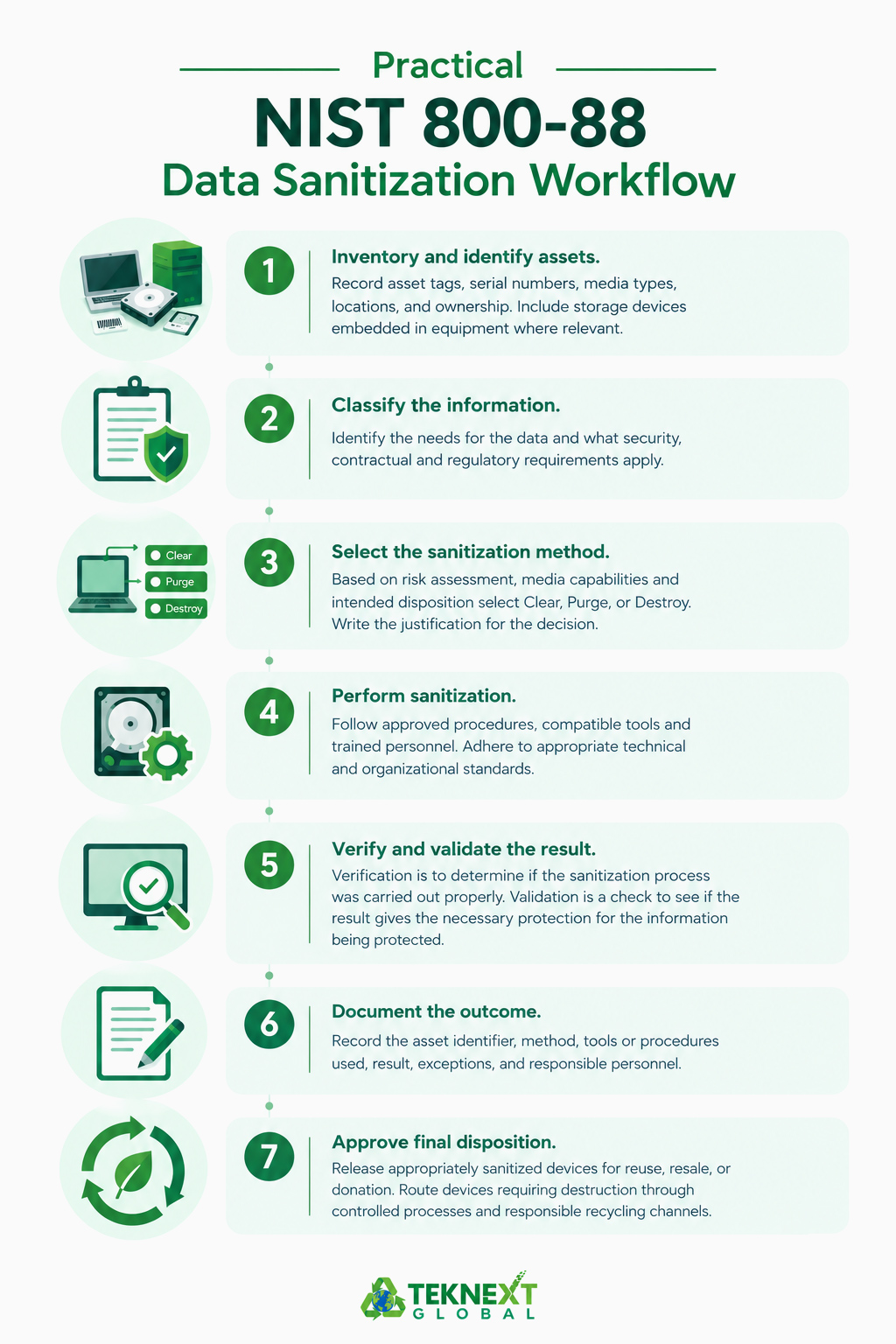
A Practical NIST 800-88 Data Sanitization Workflow
A documented workflow helps businesses maintain accountability from asset collection through final disposition.
- Inventory and identify assets. Record asset tags, serial numbers, media types, locations, and ownership. Include storage devices embedded in equipment where relevant.
- Classify the information. Identify the needs for the data and what security, contractual and regulatory requirements apply.
- Select the sanitization method. Based on risk assessment, media capabilities and intended disposition select Clear, Purge, or Destroy. Write the justification for the decision.
- Perform sanitization. Follow approved procedures, compatible tools and trained personnel. Adhere to appropriate technical and organizational standards.
- Verify and validate the result. Verification is to determine if the sanitization process was carried out properly. Validation is a check to see if the result gives the necessary protection for the information being protected.
- Document the outcome. Record the asset identifier, method, tools or procedures used, result, exceptions, and responsible personnel.
- Approve final disposition. Release appropriately sanitized devices for reuse, resale, or donation. Route devices requiring destruction through controlled processes and responsible recycling channels.
The sanitization attempts should not be considered successful if they fail. There should be a documented process in place to find out how the failure has occurred, decide on an alternative approach and avoid the early release of impacted devices.
Special Considerations for HDDs, SSDs, and Other Devices
There are a variety of technologies available for storage, and each of these technologies has its own method of sanitizing the product. It is important for businesses to know these distinctions prior to retiring equipment.
- Hard disk drives (HDDs): Use an approved technique appropriate to the drive and its condition. File deletion and quick formatting should not be assumed to remove all recoverable data.
- Solid-state drives (SSDs) and NVMe drives: Flash memory uses wear-leveling and other mechanisms that can leave data outside the reach of ordinary file-level operations. Use supported device-specific sanitization capabilities.
- Encrypted devices: Cryptographic erase may be appropriate when the encryption implementation, key management, and other required conditions meet the applicable criteria. Encryption alone does not establish that a device has been sanitized.
- Damaged or inaccessible media: If a reliable sanitization outcome cannot be achieved, evaluate whether physical destruction is necessary.
- Other data-bearing equipment: Consider USB drives, mobile devices, servers, networking equipment, and printers that may contain internal storage.
Degaussing is not a universal solution: it is unsuitable for nonmagnetic flash storage such as SSDs. The sanitization method must match the media.
Documentation, Certificates, and Compliance
You need a record to show what has happened to every asset that contains data to make data sanitization effective. Records are used to facilitate internal audits, vendor monitoring and investigations of possible data exposure.
A sanitization record or certificate should capture:
- Asset identification, including serial number and media type.
- Sanitization method and technique used.
- Relevant tools or procedures, including version information where applicable.
- Sanitization date and verification status.
- Validation results, exceptions, and corrective actions.
- The responsible technician, provider, or authorized approver.
- Final disposition, such as internal reuse, external resale, or recycling.
NIST SP 800-88 Rev. 2 provides a template for a certificate of sanitization to serve as a reference for organizations in creating their documentation process.
But just a certificate does not ensure effective sanitization. It requires accurate asset records, a proper method, reliable results and appropriate oversight.
Additionally, businesses must be able to differentiate between compliance with a legal requirement and following NIST guidance. Obligations may apply in various jurisdictions, industries, types of information and contractual commitments.
Common NIST 800-88 Data Sanitization Mistakes to Avoid
There are a number of common data sanitization mistakes that NIST 800-88 warns of that you should avoid.
- Relying on file deletion: Deleting files or formatting a drive is not automatically sufficient sanitization.
- Using one method for every device: HDDs, SSDs, and other storage technologies have different capabilities and limitations.
- Assuming encryption is enough: Cryptographic erase depends on appropriate encryption and effective sanitization of the relevant keys.
- Skipping verification: A completed process should not be accepted without appropriate checks.
- Ignoring failed devices: Damaged or inaccessible storage requires a documented alternative approach.
- Losing asset-level records: Sanitization results must be linked to the correct devices.
- Trusting unsupported vendor claims: Businesses should evaluate providers’ methods, technical capabilities, documentation, and handling procedures.
Avoiding these mistakes helps organizations maintain a consistent process and reduces the risk of sensitive information being exposed during equipment retirement.
How E-Waste and ITAD Providers Support Secure Data Sanitization
Businesses retiring large volumes of IT equipment may not have the staff, tools, or processes needed to manage every stage of sanitization internally. An experienced IT asset disposition (ITAD) provider or e-waste recycler can help coordinate the process. Understanding the difference between ITAD and e-waste recycling can help businesses determine which services they need to manage data security, asset recovery, and responsible electronics disposal.
A provider’s capabilities and the nature of the services provided determine the type of support that can be provided for asset inventory, chain-of-custody tracking, risk-based sanitization, verification, documentation, and appropriate destruction of media that cannot be sanitized reliably.
Functional equipment that has met data security requirements might be able to be reused, resold, or donated. Any equipment not capable of re-use should be sent to responsible recycling channels, taking care of batteries, circuit boards and other components.
When checking into a provider, ask them about their sanitisation methods, media they can support, failure handling process, asset level reporting, downstream recycling controls, and whether they are able to meet your organisation’s requirements. Ensure that you know what services you are putting in-house and what services you are outsourcing.
Data security and Environmental Responsibility should go hand-in-hand. When done right, sanitization can help keep sensitive information safe, while also allowing businesses to benefit from the proper use of suitable equipment and a responsible end-of-life electronics management process.
Securely store sensitive business information and ensure retired electronics are not sent into the garbage. Recycle electronics safely and securely with a responsible ITAD company.
Conclusion
The NIST 800-88 Data Sanitization standards offer a workable approach to safeguarding sensitive data during the retirement of electronic equipment. There are several methods that organizations can use to dispose of items, including Clear, Purge, and Destroy. Each method has its own set of rules that must be followed to ensure that the items are disposed of properly. Organizations can choose the method that is most suitable for their needs and follow the instructions carefully to ensure that the items are destroyed correctly. Results will be verified, and accurate records will be kept to ensure that items are disposed of as intended.
The integration of sanitization into the IT asset lifecycle also facilitates IT asset reuse, resale and responsible recycling. If there is a need for additional technical capabilities, then businesses should have documented procedures and collaborate with qualified service providers.
Frequently Ask Questions
Keep the affected device out of circulation, document the failure, and investigate whether an alternative sanitization method is viable. If the media cannot be reliably sanitized, consider physical destruction based on the risk assessment.
Not necessarily. SSDs and NVMe drives use flash memory technologies that can limit the effectiveness of conventional overwrite methods. Choose a supported, device-specific sanitization technique and verify the outcome.
No. Formatting may leave recoverable data. Use an appropriate data sanitization method and verify the results. The right approach depends on the storage technology, data sensitivity, and intended use of the device. For SSDs and NVMe drives, conventional overwrite methods may not reliably reach all data areas, so device-supported sanitization techniques may be necessary. If sanitization fails or the drive is damaged, assess whether physical destruction is required.
An ITAD provider can be valuable when a business has large volumes of retired equipment, limited in-house sanitization capabilities, damaged storage media, or complex reporting and chain-of-custody requirements. Teknext provides data destruction and sanitization services to support businesses managing retired IT assets.
Yes. When equipment remains functional and meets security requirements, it may be suitable for internal reuse, resale, or donation after successful sanitization and verification. Teknext can help businesses explore IT asset disposition services that support secure data handling and responsible end-of-life equipment management.